AI Subtitle Burner
Captioning is usually the slowest step of an edit: export, run the file through a captioner, re-import, fix the styling, export again. Eliro folds it into one pass — the AI transcribes your cut, you style the captions once, and they're rendered into the frames on export. No SRT sidecar files, no player roulette.
- Captions Rendered at Export
- Word-Timed Animated Styles
- One Style Across Your Whole Series
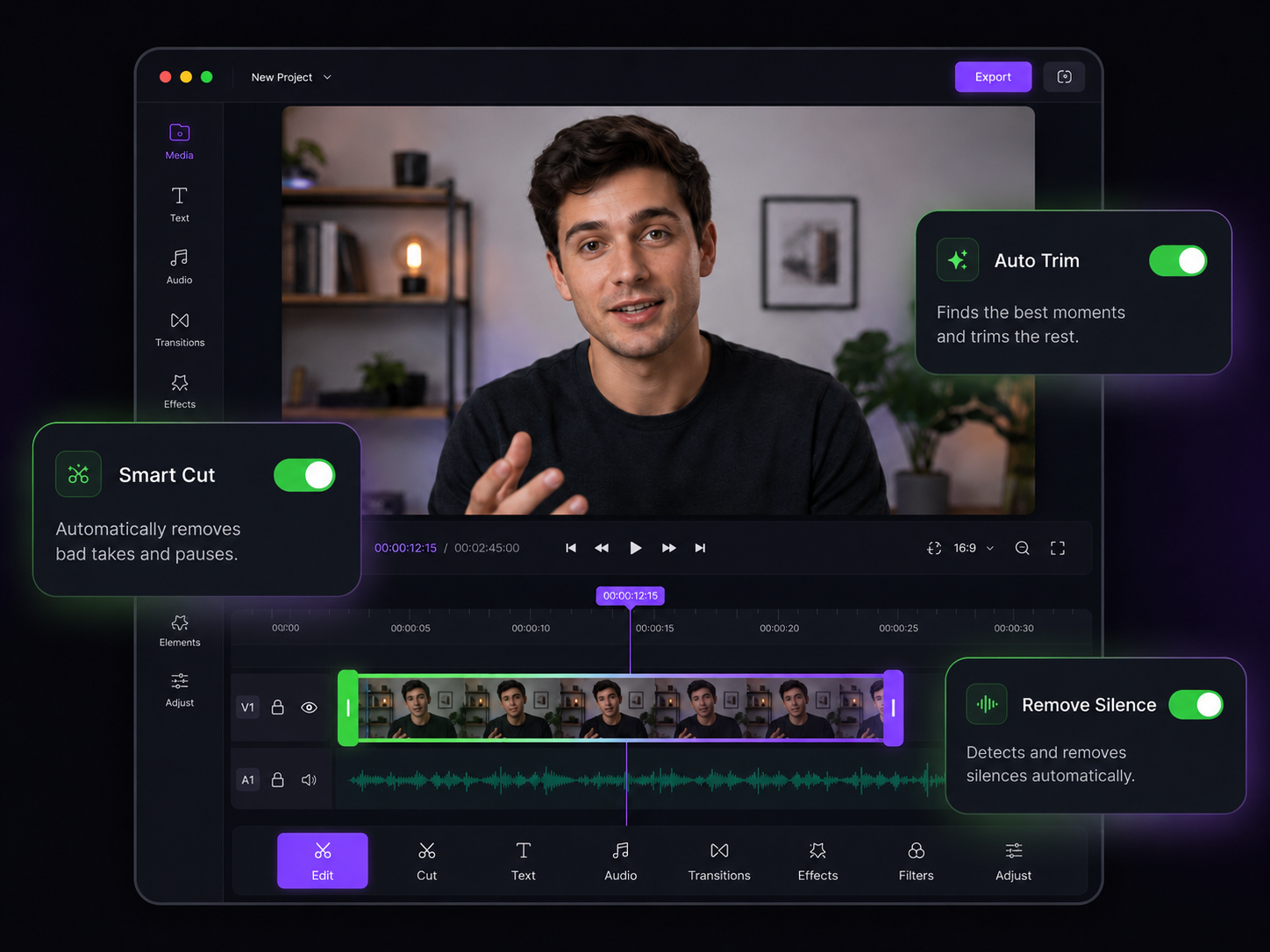
Captions That Ship Inside the File
Style once during the edit, burn at export, look identical everywhere

Styles That Match Your Edit
Word-by-word highlights, bounces, karaoke fills — pick a caption style that fits the pacing of your cut instead of fighting it.

Transcription from Your Final Cut
The AI transcribes the edited timeline, not your raw footage, so captions match exactly what survived the cut. Fix any word before export.

Bring Your Own SRT
Already have subtitles from your editor or a translator? Import SRT, VTT, ASS, or SSA files and burn them in with fresh styling on top.

A Reusable Caption Look
Save your font, colors, position, and animation as a style and apply it to every episode. Your series stays consistent without redoing the work.

Word-Level Sync
Each word lands on screen as it's spoken. Tight timing is what makes burned captions feel edited rather than slapped on afterward.

No Player Surprises
Because the captions live in the pixels, your export looks the same in TikTok, a LinkedIn embed, an email preview, or a client's ancient media player.
Where Burning Fits in Your Edit

Bring In Your Cut
Upload the edited video — or the clip plus an SRT/VTT file if the captions already exist from your editing workflow.
Style the Captions Once
AI transcribes the audio. You choose the animation, font, and position, then preview exactly how the burned result will look frame by frame.
Export the Final File
Render once. The captions are part of the video now — upload that single file anywhere without attaching subtitle tracks.
Finish the Rest of the Edit Here
Subtitle burning is one export step — these tools cover the cuts that come before it.
AI Caption Generator
Generate the caption text itself in 50+ languages before you style and burn it.
AI Video Trimmer
Tighten the cut first — remove dead air and pauses so you don't burn captions onto filler.
AI Video Cropper
Reframe to 9:16 before burning so captions sit inside the platform-safe zone.
AI Video Resizer
Lock the output dimensions before export so captions scale correctly with the frame.
AI Video Merger
Stitch multi-part edits into one file, then caption the whole thing in a single pass.
AI Video Editor
Handle zooms, B-roll, and filler removal in the same place you burn your captions.
Learn more about what you can do
Related Pages
How to Make an Explainer Video with AI — Full Guide | Eliro
How to make an explainer video with AI: distill your product into one clear problem, script 90 seconds that stay on point, and embed it where buyers decide.
AlternativeCapCut Alternative | Eliro vs CapCut
Compare Eliro and CapCut. Eliro generates complete AI videos from one prompt in 30 seconds with unlimited exports.
Free ToolFree AI Subtitle Generator | Auto-Generate Subtitles Instantly
Generate accurate subtitles for your videos in seconds with our free AI subtitle generator. No watermarks, no sign-up required. Support for 50+ languages.
TemplateMake Tutorial Videos with AI | Free AI Tutorial Generator
Produce professional tutorial videos with AI — no filming, no editing.