AI Video Editor That Runs in a Browser Tab
Forty minutes of raw talking-head footage. Desktop software wants a download, a learning curve, and a laptop that doesn't overheat. Eliro is a full timeline editor that opens in your browser and does the tedious passes for you: silences cut, "ums" removed, captions generated, B-roll suggested. The cloud does the rendering, so the machine you're reading this on is already enough.
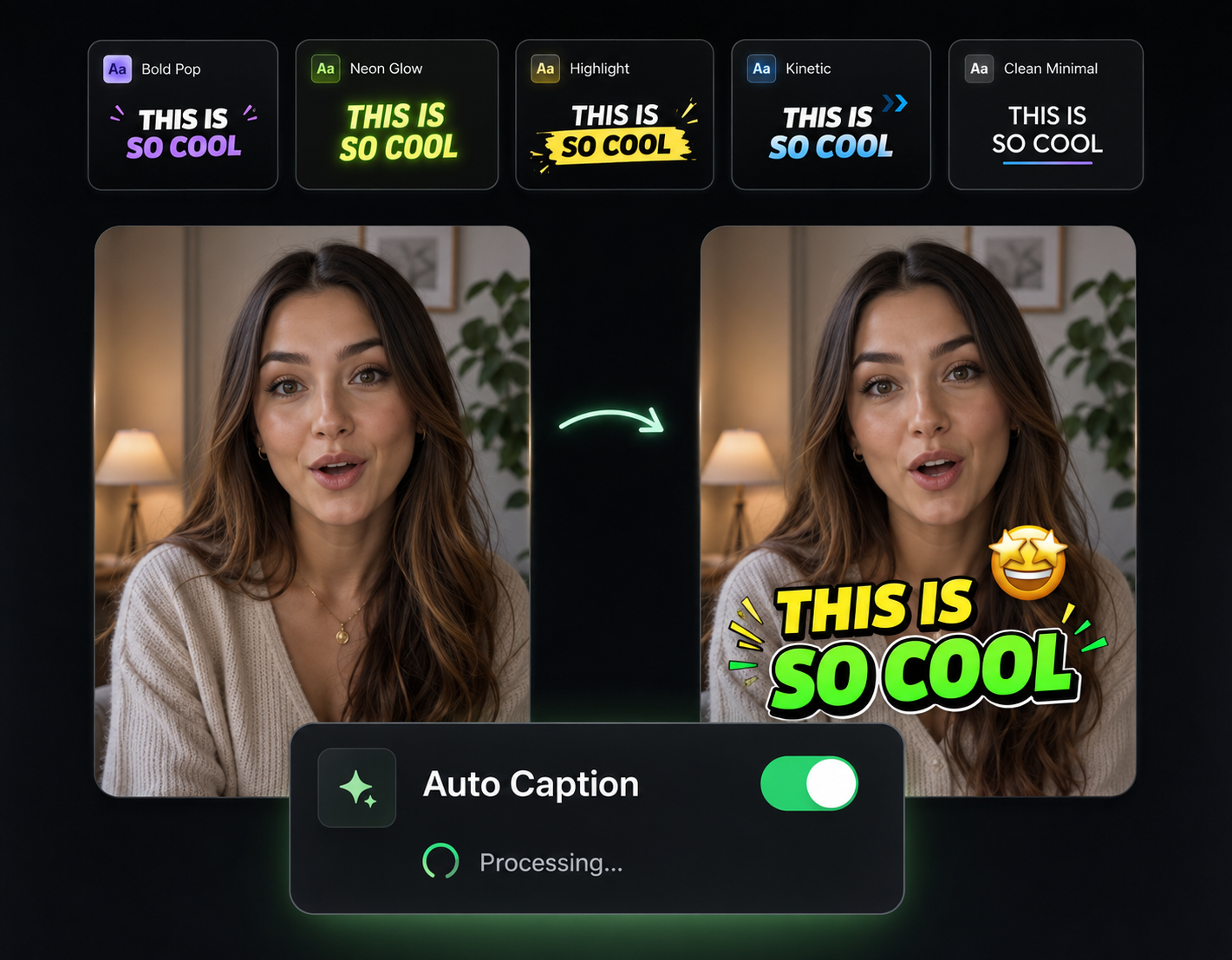
The Tedious 80% of Editing, Automated
A real multi-track timeline where the AI handles the passes editors dread

Silence and Filler Removal
The AI reads your audio waveform, finds every awkward pause and "um," and cuts them in one pass. Forty minutes of raw footage tightens into a watchable cut before you touch the timeline.
One-Click Captions on the Timeline
Transcription and animated captions are generated inside the editor, as an editable layer—not a separate tool you export to and re-import from.
B-Roll Suggested from Your Script
The editor reads what you're saying and proposes matching B-roll for each section, so talking-head footage stops being a static face for ten minutes.
Reframe Horizontal to Vertical
Shot in 16:9 but posting to Shorts? Auto-crop tracks the speaker and reframes to 9:16 or 1:1 without you keyframing the crop window.
Your First Edit, Start to Export

Drag In Raw Footage
Drop video files straight into the browser tab—no install, no import wizard. Large files upload while you start working.
Run the AI Passes
Cut silences, strip filler words, generate captions, and add music with one click each. Every change lands on the timeline where you can undo or adjust it.
Fine-Tune and Render in the Cloud
Trim clips, reorder sections, and layer tracks like any editor—then export up to 4K, rendered on our servers instead of your CPU.
Tools Already Wired Into the Timeline
These aren't separate apps—each one works as a layer inside the same edit.

AI B-Roll Generation
Generate matching B-roll for any section of your script and drop it onto the track above your main footage.

Remove Filler Words
One automated pass deletes "ums," "ahs," and dead air across the whole timeline.

Sound Effects
AI-placed whooshes and impacts on your cuts, mixed against the dialogue track.

Background Music
A music layer with auto-ducking, so the bed drops whenever someone speaks.

Auto Zoom & Pan
Punch-ins on key lines without manual keyframes—applied straight to the clip.

Publish & Schedule
Export and push the finished cut to YouTube, TikTok, and Instagram from the same tab.
Learn more about what you can do
Related Pages
Descript Alternative | Eliro vs Descript
Compare Eliro and Descript. Eliro generates complete videos from one prompt in 30 seconds.
TemplatePromo Video Maker — Sale-Ready in Minutes | Eliro
Make a promo video for your sale, launch, or event without an agency. Describe the offer; Eliro builds visuals, voiceover, and CTA in every ad format.
Free ToolFree Video Compressor | Reduce File Size Without Quality Loss
Compress videos for free without losing quality. Reduce file size by up to 90% for faster uploads, email attachments, and storage savings.
GuideHow to Make a Video Ad with AI — Script to Launch | Eliro
Learn how to make a video ad with AI: write the offer, generate hook variations, and export the right ratio for every placement. Test more creatives for less.