How to Make a Tutorial VideoViewers Can Actually Follow
The hard part of a tutorial isn't the recording — it's the teaching. Cramming three actions into one step, skipping the context experts forget beginners need, racing through the part everyone gets stuck on. This guide covers how to break a topic into steps people can follow, and how to let AI handle the visuals, narration, and captions.
- One Action Per Step
- Captions for Watching on Mute
- Pacing Tuned for Learning
Plan the Lesson, Generate the Video

Break the Topic Into Teachable Steps
State the outcome, the audience level, and the steps: "Set up a Google Analytics dashboard, for beginners, in five steps." Flag the spots where people usually go wrong — those deserve extra screen time.

AI Produces Each Step With Visuals and Narration
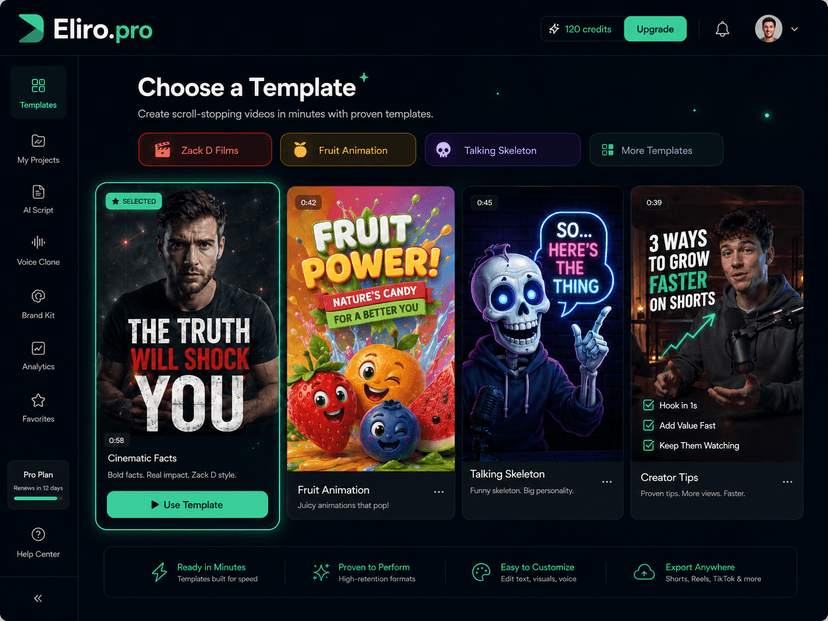
Eliro gives every step a numbered title, a visual demonstration, a patient voiceover that doesn't race ahead, and captions that keep the lesson readable with the sound off.

Fact-Check Every Step, Then Publish
Accuracy is your job — walk through each step as a viewer would. Swap in your real screenshots where the interface matters, then export for YouTube, Shorts quick-tips, or your help center.
What Good Tutorials Get Right
Anyone can list instructions. Teaching means controlling what the learner sees, hears, and reads at each moment.
Steps That Build, Not Jump
Each step assumes only what the previous steps taught. No "simply configure your DNS" curveballs halfway through a beginner lesson.
Show the Action, Not Just the Words
Every instruction gets a matching visual — the screen, the gesture, the before-and-after — because "click the third tab" means nothing until you see it.
A Narrator With Patience
Voiceover paced for someone doing the steps along with the video — quick enough to hold attention, slow enough that nobody rewinds three times.
Readable With the Sound Off
Step numbers, key actions, and warnings appear as captions, so the tutorial still teaches on a muted phone or in an open-plan office.
Beginner Mode, Expert Mode
Set the audience level and the script adjusts its vocabulary, detail, and speed. The same topic can be a gentle intro or a brisk power-user refresher.
A Library, Not a One-Off
Generate every lesson in the same format and style, so your help center or course reads as one coherent curriculum instead of a pile of disconnected videos.
Tutorials Built Step by Step
Where Tutorial Videos Earn Their Keep
You already know the material. The question is how many people it can reach.
Answer the Question Before the Ticket
When the help center shows the fix instead of describing it, customers solve their own problems — and your support queue stops repeating the same five answers.
Educators and Creators on Teaching with Eliro

Alex Rivera
@arivera_design
Eliro saved me hours on every single video — what used to take me all day now takes minutes. My views have absolutely exploded since I switched.

Sarah Jenkins
@sarahj_creates
The AI video generation is simply mind-blowing. I've never seen anything this fast and accurate.

Michael Chen
@mchen_vids
Switched from other tools and never looking back. The workflow is seamless from text to published video.

Jessica Lee
@jesslee_social
My engagement has tripled since I started using Eliro for my shorts. Absolute game changer.
Alex Rivera
@arivera_design
Eliro saved me hours on every single video — what used to take me all day now takes minutes. My views have absolutely exploded since I switched.
Sarah Jenkins
@sarahj_creates
The AI video generation is simply mind-blowing. I've never seen anything this fast and accurate.
Michael Chen
@mchen_vids
Switched from other tools and never looking back. The workflow is seamless from text to published video.
Jessica Lee
@jesslee_social
My engagement has tripled since I started using Eliro for my shorts. Absolute game changer.
Alex Rivera
@arivera_design
Eliro saved me hours on every single video — what used to take me all day now takes minutes. My views have absolutely exploded since I switched.
Sarah Jenkins
@sarahj_creates
The AI video generation is simply mind-blowing. I've never seen anything this fast and accurate.
Michael Chen
@mchen_vids
Switched from other tools and never looking back. The workflow is seamless from text to published video.
Jessica Lee
@jesslee_social
My engagement has tripled since I started using Eliro for my shorts. Absolute game changer.

David Kim
@dkim_studio
This is the future of content creation. The quality of the AI generation is unmatched.

Emma Wilson
@emma_w_marketing
Eliro handles everything - generation, subtitles, scheduling. It's like having a full production team.

Olivia Martinez
@oliviam_art
I was skeptical at first, but the results speak for themselves. The best AI video tool on the market.

James Wilson
@jamesw_tech
Finally, a tool that actually delivers on its promises. High quality video generation in seconds.
David Kim
@dkim_studio
This is the future of content creation. The quality of the AI generation is unmatched.
Emma Wilson
@emma_w_marketing
Eliro handles everything - generation, subtitles, scheduling. It's like having a full production team.
Olivia Martinez
@oliviam_art
I was skeptical at first, but the results speak for themselves. The best AI video tool on the market.
James Wilson
@jamesw_tech
Finally, a tool that actually delivers on its promises. High quality video generation in seconds.
David Kim
@dkim_studio
This is the future of content creation. The quality of the AI generation is unmatched.
Emma Wilson
@emma_w_marketing
Eliro handles everything - generation, subtitles, scheduling. It's like having a full production team.
Olivia Martinez
@oliviam_art
I was skeptical at first, but the results speak for themselves. The best AI video tool on the market.
James Wilson
@jamesw_tech
Finally, a tool that actually delivers on its promises. High quality video generation in seconds.
Learn more about what you can do
Related Pages
Make Tutorial Videos with AI | Free AI Tutorial Generator
Produce professional tutorial videos with AI — no filming, no editing.
ToolScript to Video Maker | Turn a Finished Script into Video
Already wrote the script? Paste it and AI builds the video around it—scene-matched visuals, narration that reads your words as written, and synced captions.
IndustryAI Video for Online Education | Lesson Notes to Course Videos
Turn lesson notes into finished course videos with AI -- narration, visuals, and captions included. Build full modules without filming a single take.
Free ToolFree AI Subtitle Generator | Auto-Generate Subtitles Instantly
Generate accurate subtitles for your videos in seconds with our free AI subtitle generator. No watermarks, no sign-up required. Support for 50+ languages.