Text to Video AI
You're sitting on text — blog posts, meeting notes, half-formed ideas in a doc — and none of it works as video without hours of structuring, recording, and editing. A text to video AI is supposed to close that gap; most just read your words over slideshows. Eliro actually does the video-making: it breaks your text into scenes, finds the narrative thread, and builds visuals, voiceover, captions, and music around it. Paste something rough and judge the result yourself.
- Works From Rough Text, Not Just Scripts
- AI Structures the Scenes for You
- Judge It on the Free Plan First
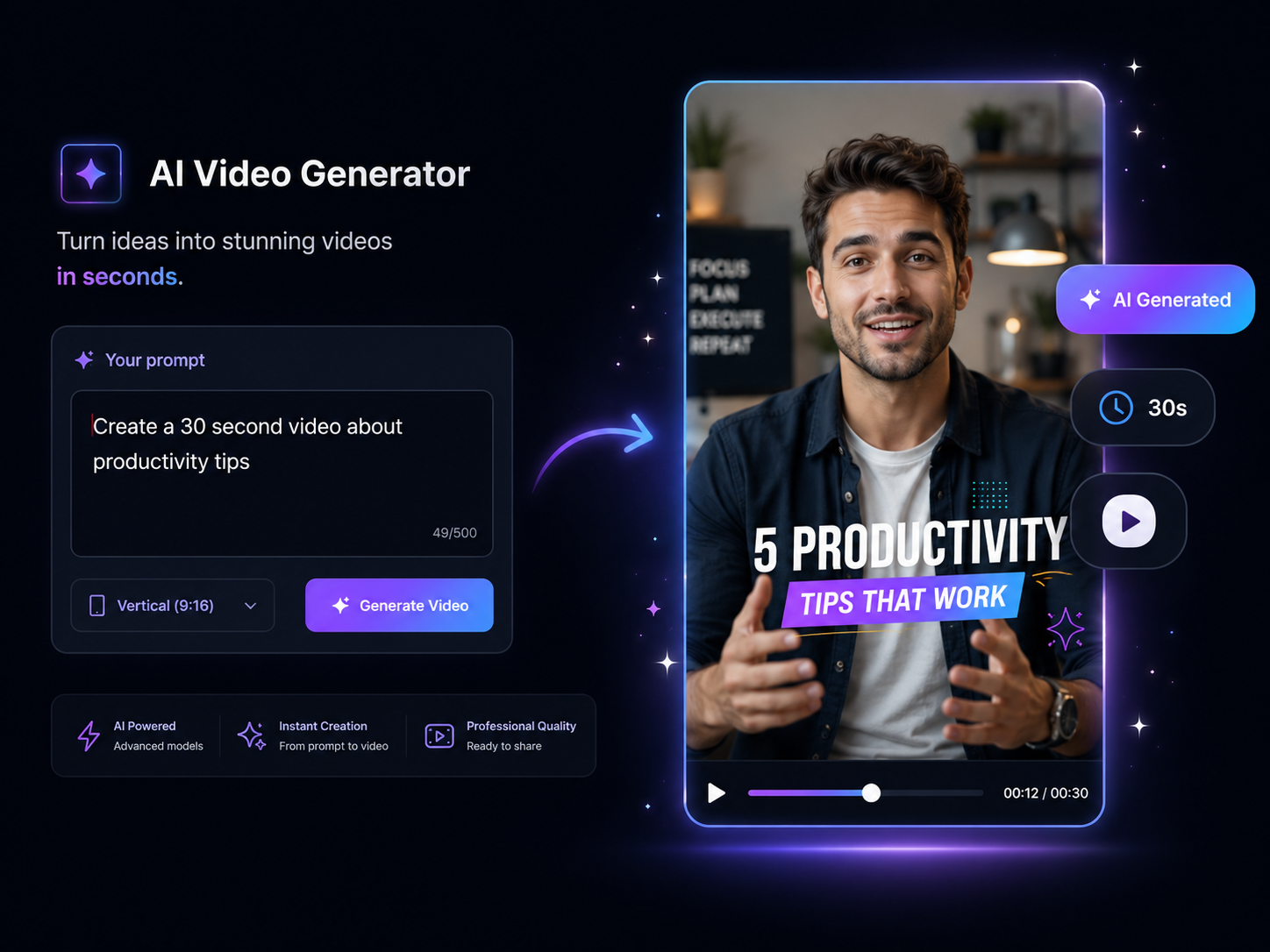
What Separates a Text-to-Video AI From a Slideshow Tool
If you're comparing options, these are the capabilities worth checking before you commit to one.

Understands Unstructured Text
Articles, tweets, product notes — Eliro doesn't need a formatted script. It finds the key points in messy input and turns them into a scene sequence with an actual arc.
Visuals Chosen by Meaning
Each scene's footage is picked for what the text means, not which keyword it contains. "Burning cash" gets the right metaphor, not a stove fire.
Narration That Doesn't Sound Synthetic
100+ voices across 50+ languages with natural pacing and emphasis. Listen to a sample before deciding — the voice is what viewers judge first.

Captions Synced Automatically
Animated, word-timed captions come standard, not as a separate subtitling pass. Sound-off viewers — most of social — get the full message.
Every Aspect Ratio From One Input
The same text renders as 9:16 for Shorts and Reels, 16:9 for YouTube, or 1:1 for feeds. One paste, three platforms covered.
Scales Past One Video
Queue a list of texts and generate them as a batch. If you're repurposing a blog archive or running a content pipeline, throughput matters as much as quality.
How Eliro Turns Text Into Video

Start From Whatever Text You Have
A published article, a bulleted outline, or a single sentence like "why cold email reply rates dropped." Rough input is fine — structuring it is the AI's job.

The AI Builds the Storyboard
Your text is distilled into a scene sequence with a beginning, middle, and end — then each scene gets visuals, narration, captions, and a music bed.
Review and Ship
Watch the result, adjust anything that misses, and export or publish. The whole cycle runs in well under the time it takes to write a shot list.
Put the Text You Already Have to Work
Your Blog Archive Is a Video Backlog
Every post you've published is a video you haven't made yet. Paste the article and Eliro extracts the argument, storyboards it, narrates it, and hands you a video version of content that already proved it works in search — without you re-outlining a word.
From a One-Line Idea to a Draft You Can React To
Sometimes all you have is "video about why onboarding emails fail." Type that, and the AI drafts the script and the video in one pass. Reacting to a finished draft is faster than staring at a blank page — keep what works, regenerate what doesn't.
When the Generated Video Needs One More Pass

AI Video Editor
Fine-tune the generated cut — reorder scenes, trim lines, or restyle captions by hand.

AI B-Roll Generation
Replace any scene's visual with freshly generated footage when the stock pick isn't right.

Sound Effects
Add emphasis hits and transitions sounds on top of the auto-selected music bed.

Background Music
Swap the AI's soundtrack for your own brand track, mixed under the voiceover.

Auto Zoom & Pan
Add motion to stiller scenes so generated videos keep their energy throughout.

Publish & Schedule
Send each finished video to YouTube, TikTok, and Instagram from the same screen.
Learn more about what you can do
Related Pages
Explainer Video Maker — From Brief to Video, No Agency | Eliro
Make an explainer video from a written brief. AI handles script, scenes, and voiceover — so your product story ships this week, not next quarter.
AlternativeInVideo Alternative | Eliro vs InVideo
Compare Eliro and InVideo. Eliro generates complete viral videos from a single prompt with AI.
Use CaseAI Video for Content Creators: Post Daily | Eliro
Posting daily on YouTube, TikTok, and Instagram burns creators out. Eliro turns one idea into a finished video for every platform. Start free.
GuideHow to Make an Explainer Video with AI — Full Guide | Eliro
How to make an explainer video with AI: distill your product into one clear problem, script 90 seconds that stay on point, and embed it where buyers decide.