YouTube Shorts Maker
Daily posting is what grows a Shorts channel — and filming, cutting, and captioning a single 45-second video can eat an entire evening. Eliro writes the hook, generates the visuals and voiceover, and times the captions for you. Type a topic, get a finished Short, post it while the idea is still fresh.
Everything a Short Needs to Hold Viewers
From the first-second hook to the final frame, each piece is built for the Shorts feed

Hooks Written for Second One
Viewers swipe within the first two seconds. The AI opens every script with a question, claim, or tension point that earns the next ten.
Faceless by Default
No camera, no lighting, no setup. AI visuals and natural-sounding voiceover carry the video, so you can run a Shorts channel without ever filming yourself.
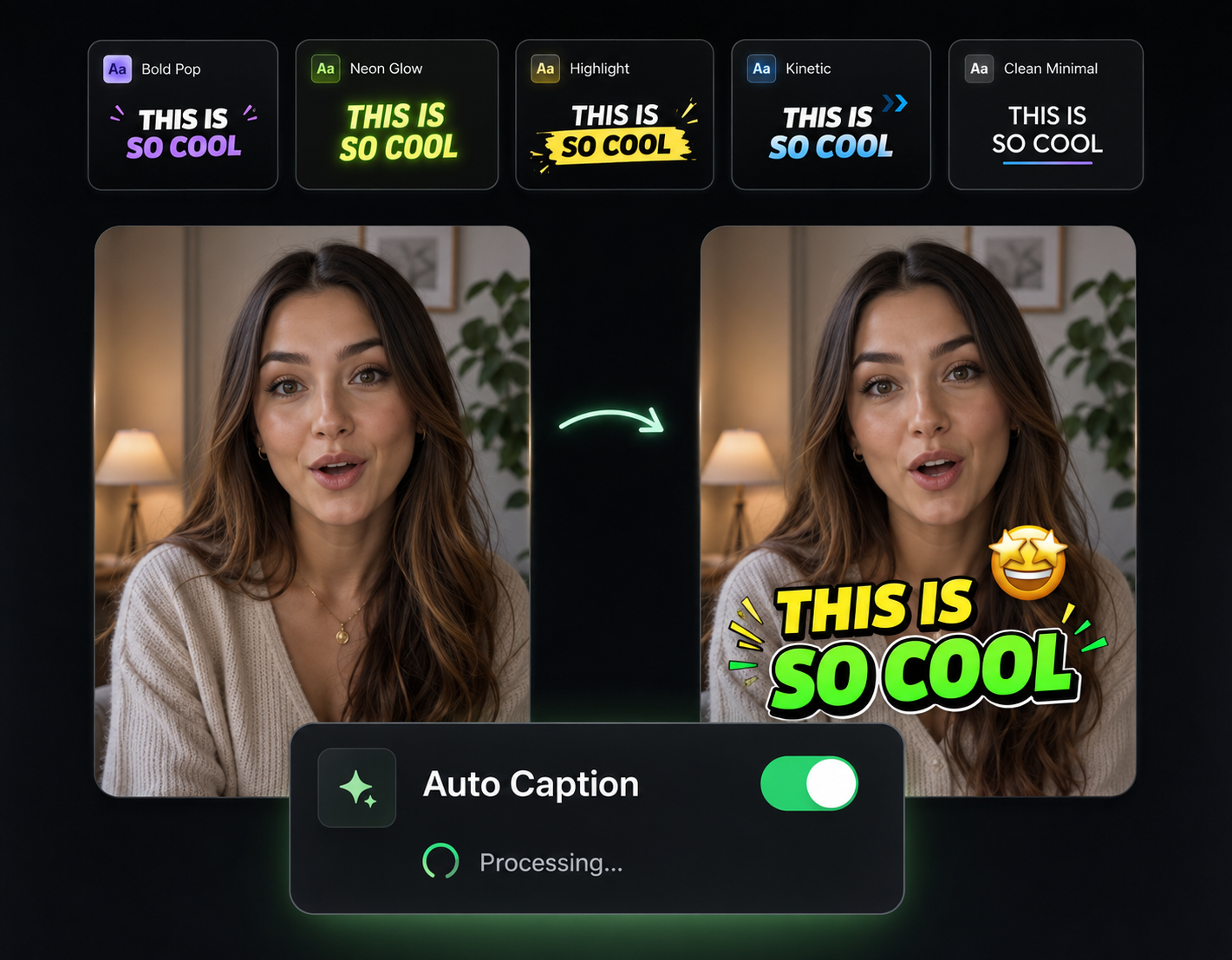
Captions YouTube Can Read
Animated subtitles keep muted viewers watching, and the caption text gives YouTube extra signal for search and the suggested feed.
Volume Without Burnout
When a Short takes minutes instead of an evening, posting daily stops being the bottleneck. Consistency is the one lever you fully control.
How a Topic Becomes a Finished Short

Type Your Topic
Give the AI an idea, a niche, or a rough angle. It drafts a Shorts-length script that opens with a hook.
Watch the Pieces Assemble
Visuals, voiceover, animated captions, and transitions are generated and stitched into a vertical 9:16 video automatically.
Post and Repeat
Export the Short and upload it to YouTube — then queue up tomorrow's in the time it took to read this sentence.
Why Shorts Are Worth the Daily Grind
Shorts Are Your Channel's Front Door
Most new viewers meet a channel in the Shorts feed, not through search. Each Short is a low-cost audition: hook someone for 30 seconds and your long-form videos gain their next regular.
Muted Viewers Still Count
A big share of Shorts get watched with the sound off. Animated captions keep those viewers to the end — and completion rate is exactly what the Shorts algorithm feeds on.
Round Out Your Shorts Pipeline
Pair the Shorts maker with these tools to keep quality up while you scale output.

AI B-Roll Generation
Drop AI-generated B-roll over voiceover-heavy Shorts so there's always something moving on screen.

Sound Effects
Punch up transitions and reveals with timed sound effects — small details that make a Short feel produced.

Background Music
Set the energy of each Short with a music bed mixed under the voiceover at the right level.

Auto Zoom & Pan
Subtle zooms on key lines keep the frame moving and thumbs off the swipe.

Publish & Schedule
Queue a week of Shorts across YouTube, TikTok, and Instagram in one sitting.
Learn more about what you can do
Related Pages
AI Video Generator for YouTube — Idea to Upload | Eliro
Generate upload-ready YouTube videos from a topic prompt. Script, voiceover, visuals, and captions handled — so a 10-minute video doesn't cost a weekend.
Free ToolFree TikTok Video Maker | Create Viral TikToks with AI
Make TikTok videos for free with AI. Auto-generate viral-ready content with trending effects, captions, and music. No editing experience needed.
Use CaseAI Video for Social Media Managers | Eliro
Feed every content calendar without an editor. Eliro turns briefs into platform-ready video for Reels, TikTok, and LinkedIn -- scheduled from one dashboard.
TemplateMake Instagram Reels with AI — Free Reel Maker | Eliro
Turn a written idea into a ready-to-post Instagram Reel. Eliro builds the 9:16 video, transitions, captions, and music so you can post daily without an editor.