Auto Subtitle Generator
If you caption every upload by hand, you know the routine: play two seconds, pause, type, rewind because you missed a word, repeat for twenty minutes. Eliro's auto subtitle generator replaces that entire routine. Upload a video and the AI transcribes the speech, syncs each word to the moment it's spoken, and punctuates the lines properly—accurate enough that you'll usually just skim and hit export.
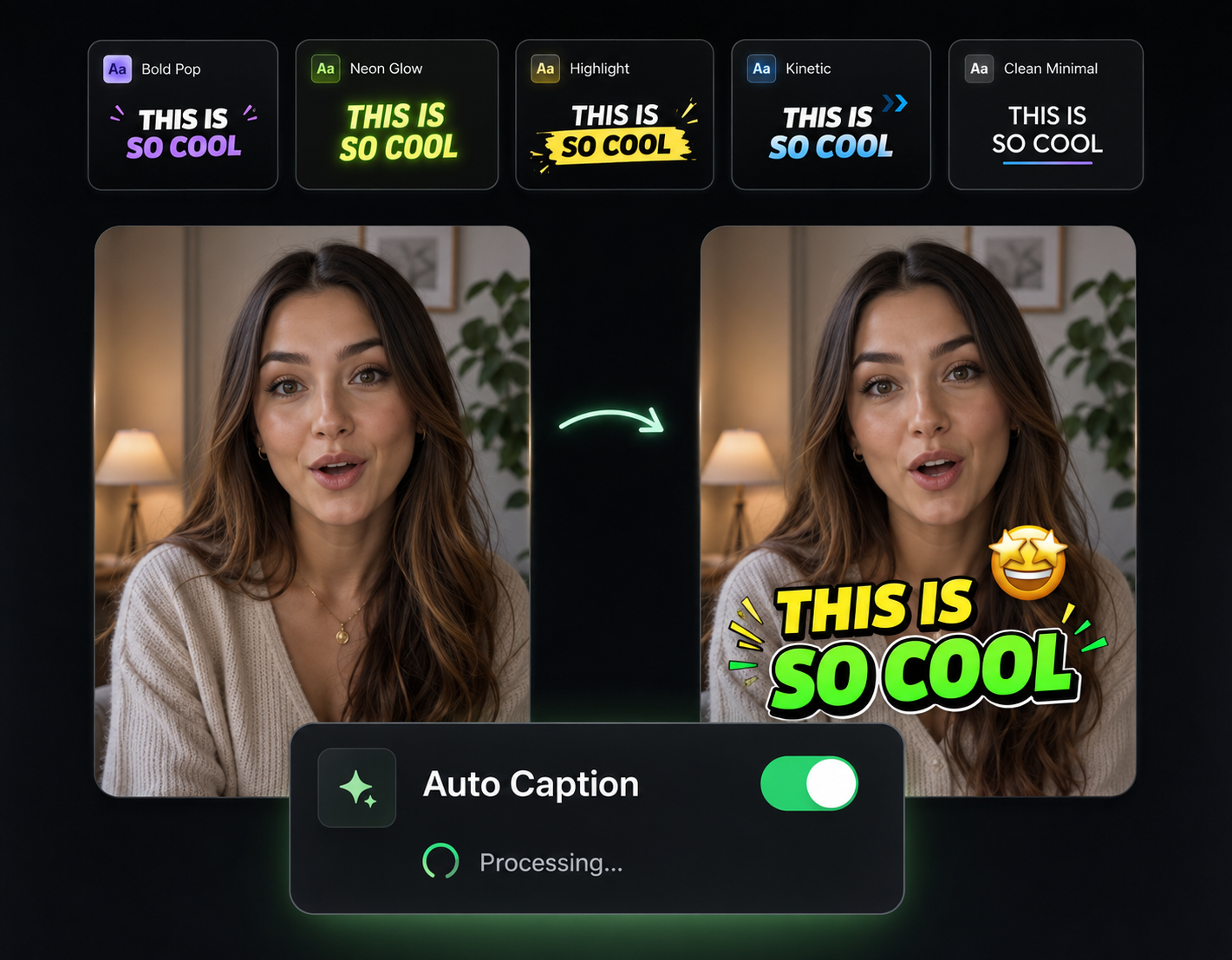
Transcription You Don't Have to Babysit
The slow part of captioning is the typing and the timing. The AI does both.

Skim, Don't Retype
The AI transcribes full videos in seconds and gets the words right consistently—including punctuation and sentence breaks. Your job shrinks to a quick proofread.

Accents and Fast Talkers
Trained on real-world speech, not studio narration. It keeps up with fast delivery, regional accents, and imperfect mic setups without falling apart.

Word-Level Timing
Every word is synced to the exact moment it's spoken, so captions never lag behind the audio or flash by too early. No manual timecode nudging.

Caption a Backlog in One Sitting
Publishing daily? Run video after video through the generator without resetting settings each time. The bottleneck stops being subtitles.
How the Auto Subtitle Generator Works

Upload Your Video
Drop in a file or paste a URL. MP4, MOV, AVI, and other major formats are supported—no conversion step first.
AI Transcribes and Syncs
The engine converts speech to text, adds punctuation, and aligns every word to its timestamp. A full transcript appears in seconds.
Proofread and Export
Scan the transcript, click any line to fix a rare miss, pick a style, and export with subtitles applied. Done before your coffee cools.
From Raw Audio to Finished Captions
Transcribe First, Style in One Click After
Once the transcript is generated, applying a look is a single click—pick a template and the whole video updates. The hard part (accurate text and timing) is already handled, so styling never means redoing work.
Caption Every Upload, Not Just the Big Ones
Most feeds autoplay on mute, so uncaptioned videos lose viewers in the first seconds. When generating subtitles takes less time than writing the post caption, there's no reason any upload goes out without them.
What to Run After the Transcript Is Done
Accurate captions are step one. These tools use the same upload to finish the rest of the edit.

Remove Filler Words
The transcript already knows where every "um" lives—remove them from the video in one click.

Auto Zoom & Pan
Add subtle punch-ins on key lines so captioned talking-head clips stay visually alive.

Background Music
Layer a music bed under your speech without drowning out the words your captions follow.
AI Video Editor
Open the captioned video in a full editor for trims, overlays, and final tweaks.

Publish & Schedule
Send finished, captioned videos straight to YouTube, TikTok, and Instagram on a schedule.
Learn more about what you can do
Related Pages
How to Make an Explainer Video with AI — Full Guide | Eliro
How to make an explainer video with AI: distill your product into one clear problem, script 90 seconds that stay on point, and embed it where buyers decide.
AlternativeCapCut Alternative | Eliro vs CapCut
Compare Eliro and CapCut. Eliro generates complete AI videos from one prompt in 30 seconds with unlimited exports.
Free ToolFree AI Subtitle Generator | Auto-Generate Subtitles Instantly
Generate accurate subtitles for your videos in seconds with our free AI subtitle generator. No watermarks, no sign-up required. Support for 50+ languages.
TemplateMake Tutorial Videos with AI | Free AI Tutorial Generator
Produce professional tutorial videos with AI — no filming, no editing.